A flexible online approach suitable for every learner
Our online courses are designed to be a blend of self-paced learning through our online classroom and guided learning through live video sessions with our instructors.
Coding Youngsters
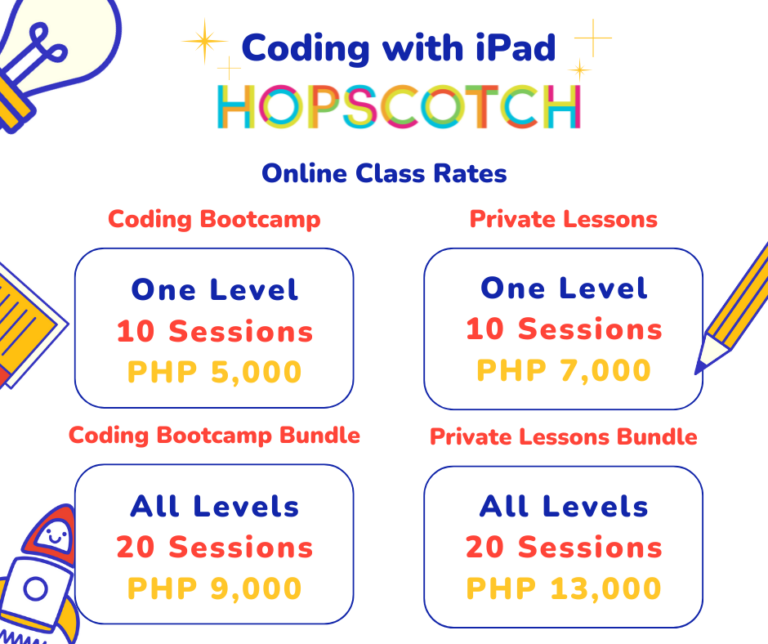
Coding with iPad
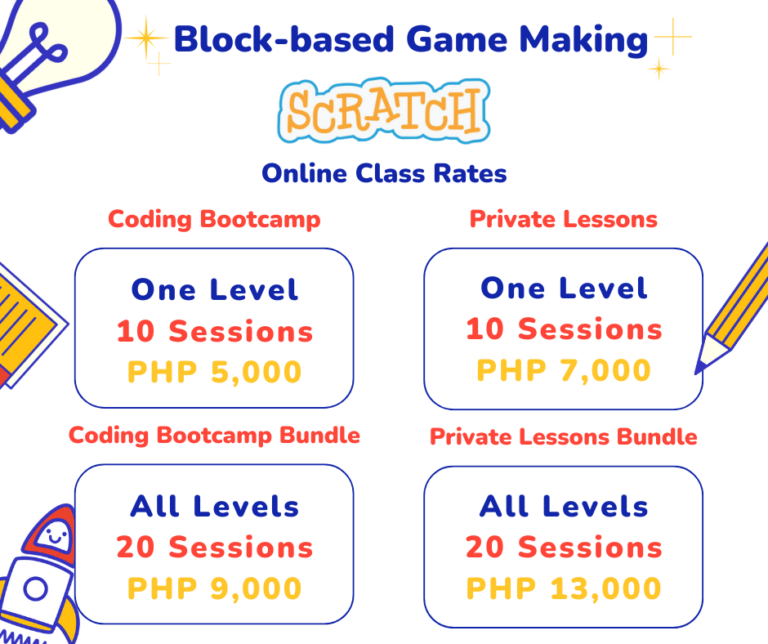
Block-based Game Making
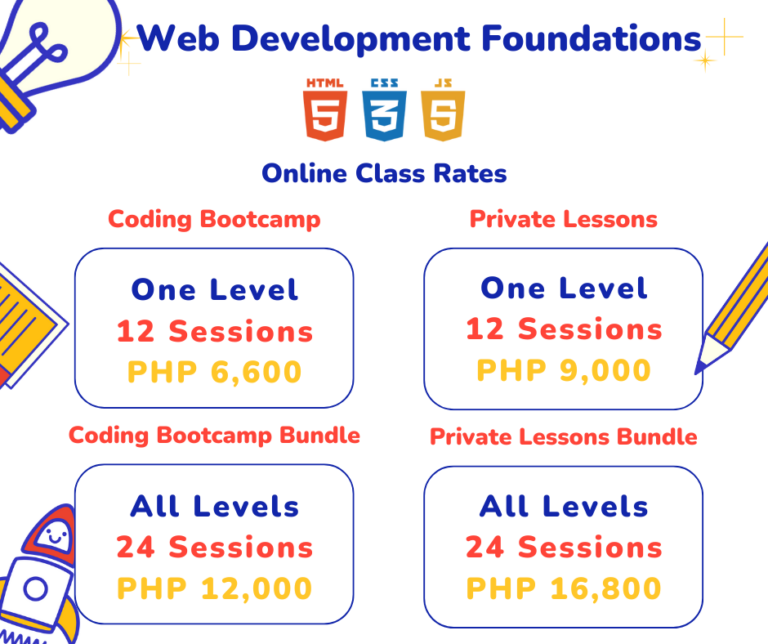
Web Development Foundations
Programming foundations
Worldbuilding in Minecraft
Coding Youngsters
Coding Youngsters
In this course, students will be introduced to programming and related concepts using ScratchJr, a visual, block-based programming language that has an easy-to-use and kid-friendly interface. Through ScratchJr, students will learn the very basics of programming without dealing with complex syntax.
Platform/Application: ScratchJr
Device Requirements:
Computer or laptop to join the online classes over Google Meet or Zoom
Tablet (can be either of the following):
iPad iOS 11 or higher
Android Tablets 7 inches or larger with Android 7 (Nougat) or higher
Online Coding Bootcamps for groups and Online Private Lessons are available
Advisable for Kids
5-7 years old
LEVEL 1: Basic Coding using symbols in scratchjr
How Computers Work Introduction to computers and programming
Numbers in Block Assigning action block frequency
Repeating Looping for efficiency
Sequencing and Events Arranging code for logical output using multiple events
Final Project Making and Presentation Creating a simple obstacle game on tablets
LEVEL 2: animating characters and stories in scratchjr
Art in ScratchJr Exploring the drawing platform and how to edit character appearance
Talking Characters and Sending Signals using say block for character speech and sending signals using message events
Sounds in ScratchJr Adding sound blocks to character actions
Changing Scene Adding page and scenes to project
Final Project Making and Presentation Creating a Choose Your Own Adventure Story Game
Coding with iPad introduces computer programming to kids through the visual, block based programming language, Hopscotch, on an iPad. Students will go through foundational coding concepts and apply this when they complete their final projects – interactive games.
Platform/Application: Hopscotch from the App Store
Device Requirements:
Computer or laptop to join the online classes over Google Meet or Zoom
iPad iOS 13 or higher
Online Coding Bootcamps for groups and Online Private Lessons are available
Advisable for Kids
8-14 years old
level 1: basic ipad game creation in hopscotch
Introduction to Hopscotch and Programming Brief overview of the platform and introduction to computer programming
Animations Movement combinations for Hopscotch characters
Events/ Bumps Relating actions of characters, and setting up different iPad conditions: tilt, tap, shake
Looping Use of control flow blocks for efficiency in coding
Shapes Use of Math concept to instruct characters movement
Artificial Intelligence Making character follow another character
Final Project Making and Presentation Creating a basic obstacle game on the iPad
level 2: advanced ipad game creation in hopscotch
Abstraction Creating custom blocks shared across different characters
Variables Initializing, incrementing and decrementing values stored in variables
Gravity In depth implementation of variables and abstraction topics
Rock Paper Scissors Game! Making use of conditionals and variables to create a rock, paper, scissors game
Final Project Making and Presentation Creating an advanced obstacle game with variables on the iPad
Block-based Game Making is an introduction to computer programming using the visual, block-based programming language, Scratch. Throughout this course, students learn how to code their own games and their own stories through animation.
Platform/Application: scratch.mit.edu
Device Requirements:
Computer or laptop with the following web browsers:
Google Chrome 63 or higher
Microsoft Edge 15 or higher
Mozilla Firefox 57 or higher
Safari 11 or higher
Online Coding Bootcamps for groups and Online Private Lessons are available
Advisable for Kids
8-14 years old
level 1: Basic game making in scratch
Introduction to Scratch and Programming Brief overview of the platform and introduction to computer programming, flowcharts and debugging
Negative numbers, units, the coordinate system moving characters in Scratch with the help of math
Repeat and Forever Looping code for efficiency
Events Exploring different options to move characters and influence actions
Conditionals If-then relationships in coding
Final Project Making and Presentation Creating a basic obstacle game
level 2: advanceD game making in scratch
Variables Initializing, incrementing and decrementing values stored in variables
Scores Creating scores for games
Abstraction Creating custom blocks shared across different characters
Broadcasts Making characters communicate with each other by broadcasting and receiving signals
Final Project Making and Presentation Creating an advanced obstacle game with scores and life points
level 3: storytelling and animation in scratch
Character Animation Switching costumes and creating character monologue and dialogue
Moving Between Scenes Layering backgrounds and changing settings
Animation Features Creating story effects and adding narration
Animation Features Part 2 Using text-to-speech, video sensing and custom blocks
Final Project Making and Presentation Animating your own short stories in Scratch
In this course, students get an introduction to HTML (Hypertext Markup Language) and CSS (Cascading Style Sheets), two of the core technologies in Web Development Foundations. They are the basis for building websites and web applications.
Platform/Application: SublimeText
Device Requirements:
Computer or laptop with the following minimum requirements:
Operating System
Windows 10 32 bit or 64 bit
MacOs OS X (10.7 or later)
Ubuntu 2.6 or newer 64 bit
Web Browsers:
Google Chrome 63 or higher
Microsoft Edge 15 or higher
Mozilla Firefox 57 or higher
Safari 11 or higher
Online Coding Bootcamps for groups and Online Private Lessons are available
Advisable for Kids
10 years old and above
level 1: Web design with html/css
Introduction to the Internet and the World Wide Web How computers communicate through a network
How Websites Are Made and HTML Basics How to make a simple web page with basic HTML code
Tags and Attributes Organization of data and linking web pages
Basic Forms Interaction between users and websites
Styling our Web Pages using CSS Adding styles using the different types of CSS
Layout and Visual Models Using the box model and organization of elements
Final Project Making and Presentation Creating a webpage using HTML and CSS elements
level 2: basic web scripting with javascript
Web Scripting and JavaScript Dynamic and Interactive web pages and how to create it
Data Types Type of data stored in JavaScript and how to utilize each
Conditionals Formulating if-then statements and response
Loops Creating repeating scripts
Functions Performing specific task using related statements
Handling HTML Events Manipulating HTML/CSS elements for scripting
Final Project Making and Presentation Creating a web page that processes data input
In this course, students get an introduction to the foundations of programming using Python, an interpreted, high-level programming language that has a syntax similar to the English language, and is widely used in the tech industry;
Platform/Application: Thonny
Device Requirements:
Computer or laptop with the following minimum requirements:
Operating System
Windows 10 32 bit or 64 bit
MacOs OS X (10.7 or later)
Ubuntu 2.6 or newer 64 bit
Web Browsers:
Google Chrome 63 or higher
Microsoft Edge 15 or higher
Mozilla Firefox 57 or higher
Safari 11 or higher
Online Coding Bootcamps for groups and Online Private Lessons are available
Advisable for Kids
10 years old and above
Level 1: Building programS IN python
Introduction to Programming Reading and following instructions step-by-step
Flowcharts and Debugging Writing correct instructions through codes and symbols
Introduction to the Turtle Library Part 1 Introduction to and use of basic Turtle library commands
Numbers and the Coordinate System
Using arithmetic operations and precedence rules
Shapes, Variables, and Data Types Getting and storing data with the appropriate data types
Strings and Typecasting Using string and type casting methods
Conditionals Making decisions and using comparison and logical operators
Loops Creating repeating scripts
Functions Modular programming and passing data
Final Project Making and Presentation Creating a short program using programming basics in Python
level 2: game development in python
More on Functions, Conditionals, and Loops Using return statements, creating menus and writing nested loops
Lists and Dictionaries Using lists and dictionaries to store and manage multiple data
Object Oriented Programming Understanding and applying the four pillars of object oriented programming to create classes and instances of objects
Graphic User Interface Part 1 – Static Game Display Running PyGame and creating static visual displays
Graphic User Interface Part 2 – Events and Controlling Game Elements Controlling and moving visual displays through events
Graphic User Interface Part 3 – Sprites and Other Game Elements Creating sprites and adding effects and interaction
Final Project Making and Presentation Creating a Space Shooters arcade game with graphics in Python
In this course, students will be introduced to the basics of programming using Minecraft, a sandbox and open world game, and MakeCode, a visual block-based programming platform. Through Minecraft and MakeCode, students will learn the basics of coding while interacting with programs inside their Minecraft worlds.
Platform/Application: Minecraft Education Edition
Device Requirements:
Computer or laptop with the following minimum requirements:
Operating System
For Windows:
Windows 32 bit or 64 bit Windows 10 version 14393.0 or higher
Windows 32-bit or 64-bit Windows 11
For Mac:
macOS Catalina 10.15 and up
Processor (CPU):
Intel Core i3-3210 3.2 GHz
AMD A8-7600 APU 3.1 GHz or equivalent
Memory (RAM): 4 GB
Graphics (GPU):
At least Intel HD Graphics 4000 (Ivy Bridge)
AMD Radeon R5 series (Kaveri line) with OpenGL 4.4
Storage: 2 GB HDD
Online Coding Bootcamps for Groups and Online Private Lessons are available
Advisable for Kids
10 years old and above
LEVEL 1: Basic Minecraft Coding with Makecode
Introduction to Programming and MakeCode Exploring the Minecraft and MakeCode environment.
Code Blocks and Agents Identifying and utilizing different types of code blocks for agent actions.
Numbers and Players Shortening agent actions and specifying agent directions with the help of numbers.
Logic and Conditionals Using logic to create dynamic programs to improve agent actions.
Loops Applying different types of loops to optimize agent action.
Final Project Creating basic Minecraft structures using the agent.
LEVEL 2: Advanced Minecraft Coding with Makecode
Positions and Shapes Exploring and utilizing cardinal directions and coordinate systems in accurately representing object position.
Builder and Variables Instructing the Builder to create structures using variables.
Arrays and Functions Storing and sharing multiple data using arrays.
More on Functions Developing programs using dynamic functions.
Final Project Automating the worldbuilding process using code.